Digital Nomad Packing List: What's in My Backpack?
The tech, camera gear and travel essentials I use to run my business from anywhere in the world.
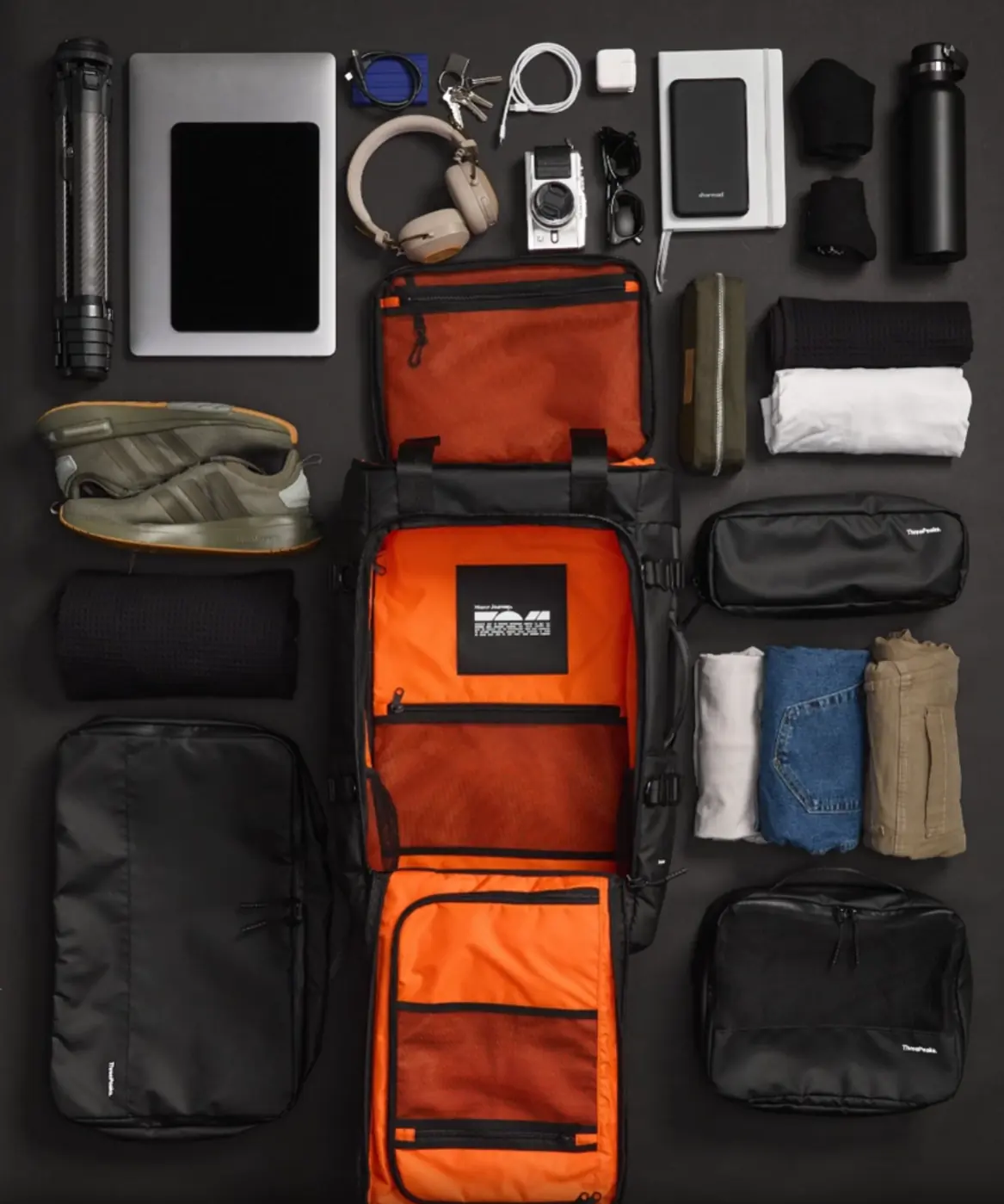
One of the best things about building a location-independent lifestyle is being able to work from almost anywhere. Whether I'm in a coffee shop, travelling abroad, or spending time somewhere new, I want to be able to run my business without being tied to an office.
But I've learned that you don't need to carry half a computer shop around with you to make it happen.
My setup is built around a 13-inch MacBook Pro with the M1 chip and my iPhone 17 Pro Max. Between them, I can edit videos, manage my trading activities, check emails, run my businesses, and create content for The Geordie Nomad.
For filming, I also carry a DJI Osmo Pocket 4 Creator Combo. Keeping my equipment relatively compact means I can create content while travelling without lugging around a full camera kit.
I've also put some thought into staying connected and keeping everything charged. My setup includes a Saily travel eSIM, an Anker 25,000mAh power bank, and a Ubiquiti UniFi Travel Router. When I'm away in the campervan, the heavy lifting on power is done by a power station, and I've written that up in my Aferiy P310 review (UK).
This isn't a list of gadgets I've found on the internet and decided to recommend. These are the products I use as I work towards building a more flexible, location-independent life.
Here's what's in my backpack, why I use it, and what I'd recommend considering if you're putting together your own digital nomad setup.
MacBook Pro 13-inch M1
My MacBook Pro is the heart of my mobile office. I use the 13-inch M1 model for video editing, managing my businesses, checking emails, working on my websites, and monitoring my trading activities.
Although it isn't the newest MacBook on the market, it remains a useful machine for my day-to-day work. The compact size makes it easy to carry, and Apple's M1 chip provides plenty of performance for the tasks I regularly do.
I like being able to open my laptop wherever I am and get straight to work. I don't need a separate office computer to keep my business moving.
What I like: Compact, capable, portable, and suitable for running my business and editing content while travelling.
What I'd consider: If you're buying a laptop specifically for demanding video editing, look at your footage, editing software, memory requirements, and storage needs before choosing a model. My M1 MacBook suits my workflow, but your needs might be different.
Official page: MacBook Pro (13-inch, M1, 2020) tech specs on Apple's UK site
iPhone 17 Pro Max
My iPhone 17 Pro Max is much more than a phone. It's my everyday communication device, a pocket-sized camera, and an essential tool for running my business.
I use it to film content, take photographs, check emails, manage messages, and keep on top of things while I'm away from my laptop.
Having a capable camera with me all the time means I can capture interesting places and experiences without needing to carry dedicated camera equipment everywhere. It's also useful when I want to record something quickly without setting up a separate camera.
For a digital nomad who wants to document their travels, create social media content, and stay connected with clients, having a good smartphone can make a real difference.
What I like: It's always with me, handles a wide range of everyday tasks, and means I don't need a separate camera for every situation.
Official page: iPhone 17 Pro Max tech specs on Apple's UK site
DJI Osmo Pocket 4 Creator Combo
When I want to take my content creation a step further, I use the DJI Osmo Pocket 4 Creator Combo.
A dedicated handheld camera gives me another option for filming travel footage, capturing my surroundings, and creating videos for The Geordie Nomad.
The compact design of the Osmo Pocket range makes it particularly appealing for travelling. It's easier to carry than a traditional camera setup, and the integrated gimbal helps produce smoother footage when moving around.
The Creator Combo is the option I use, giving me a dedicated filming setup rather than relying entirely on my phone.
For anyone planning to document their travels on YouTube, I'd consider a camera like this alongside a good smartphone. You can use your phone for everyday filming and keep the dedicated camera for situations where you want a different shooting experience.
What I like: A compact, dedicated camera for travel content that complements my iPhone rather than replacing it.
Official page: Osmo Pocket 4 on DJI's UK site
Anker 25,000mAh 165W power bank
When I'm travelling, I don't always want to rely on finding a power socket every time my devices need charging. That's why I carry the Anker 25,000mAh 165W power bank.
It's designed to charge laptops, smartphones, and other USB-powered devices. It has a 25,000mAh capacity, a maximum combined output of 165W, and built-in USB-C cables, which help reduce the number of separate cables I need to carry.
For my setup, it's particularly useful for keeping my MacBook and iPhone charged while I'm working away from a desk.
The built-in cables are a practical feature because they mean I have fewer accessories to remember when packing.
It's worth remembering that the advertised capacity isn't the amount of power your devices will actually receive, because energy is lost during charging.
What I like: High power output, generous capacity, built-in cables, and the ability to charge multiple devices.
My advice: If you're buying a power bank for travel, check its capacity, output, weight, and airline restrictions before you go. A high-capacity power bank is useful, but it still needs to fit comfortably into your travel setup.
Official page: Anker 25,000mAh 165W power bank with built-in USB-C (model A1695) on Anker UK
Ubiquiti UniFi Travel Router (UTR)
Internet connectivity is essential when your business depends on being able to work from different locations.
I use the Ubiquiti UniFi Travel Router, also known as the UTR, as part of my travel networking setup.
A travel router can be useful when you're moving between accommodation, temporary workspaces, and other locations with different network arrangements. Rather than treating connectivity as an afterthought, I like having dedicated networking equipment as part of my kit.
For someone who works online, managing a business, or accessing trading platforms while travelling, it's worth thinking about how you'll connect your devices before you leave home.
One important point: a travel router doesn't automatically provide an internet connection. Its usefulness depends on how you connect it to an available network or compatible internet source.
What I like: Having dedicated networking equipment in my travel kit rather than relying entirely on whatever connection happens to be available.
My advice: Check the available internet sources at your destination and make sure you understand how your router will connect before relying on it for work.
Official page: UniFi Travel Router on Ubiquiti's UK store
Saily travel eSIM
Staying connected when travelling internationally is one of the most important parts of running a location-independent business.
I use Saily for my travel eSIM, which gives me an option for accessing mobile data without having to rely entirely on public Wi-Fi or find a local physical SIM card at every destination.
An eSIM is a digital SIM that can be installed on a compatible phone. Depending on the destination and plan, it allows you to purchase mobile data for your trip and connect to a supported local network.
For me, it's a useful option to have when I need to check emails, manage my business, use online services, or get connected while I'm out exploring.
Before travelling, I'd always check the available plans, data allowances, coverage, and activation requirements for the country I'm visiting.
What I like: Having a travel data option ready to use instead of making connectivity something I need to sort out after arriving.
My advice: Check that your phone supports eSIM, confirm the destination is covered, and install or prepare your plan before you travel. Remember that a data-only eSIM may not include a conventional phone number or voice calls.
Official page: Saily eSIM #ad (affiliate link)
Three Peaks GBR Travel / Adventure 42L backpack
Your backpack is one of the most important decisions when putting together a digital nomad setup. It needs to carry your equipment comfortably while giving you enough space for the rest of your travel essentials.
I use the Three Peaks GBR Travel / Adventure 42L backpack.
The 42-litre capacity gives me room to organise my laptop, filming equipment, power bank, networking gear, and other essentials without having to spread everything across multiple bags.
I like the idea of having one main backpack for my travel and work equipment. The goal is to keep everything together and make it easier to move between locations.
When choosing a backpack, I would pay particular attention to comfort, protection for electronics, internal organisation, and whether the overall size suits the way you travel.
What I like: The 42-litre capacity and the ability to carry my work and travel equipment together.
My advice: Don't choose a backpack based on capacity alone. Think about the weight of your equipment, how long you'll be carrying it, and whether it meets the cabin baggage limits of the airlines you use.
Official page: Travel / Adventure 42L on Three Peaks GBR
What I've stopped carrying
The iPad
The biggest change I've made to my setup is leaving my iPad behind.
I used to think having a tablet as well as a laptop and phone would make travelling easier. In reality, I found myself carrying another device that I didn't really need.
I found that my MacBook Pro and iPhone already covered practically everything I needed. These days, I stick to my MacBook Pro and iPhone 17 Pro Max.
My laptop handles the serious work, including video editing, trading, and running my businesses. My iPhone takes care of emails, messages, quick tasks, filming, and checking things when I don't want to get my laptop out.
Carrying a tablet as well meant having another device to charge, protect, and pack. By leaving the iPad at home, I've simplified my setup and reduced the amount of equipment I need to carry.
My advice? Before buying another device, ask yourself whether it genuinely adds something to your workflow or simply duplicates what you already have.
Unnecessary gadgets
I'm trying to build a setup around equipment that has a clear purpose.
If something doesn't help me work, create content, stay connected, or make travelling easier, I question whether it needs to come with me.
Every extra gadget takes up space and adds weight. Keeping things simple makes it easier to pick up my bag and get on with the journey.
What I'd tell you if we were having a brew
If you're thinking about becoming a digital nomad, my biggest piece of advice is not to spend a fortune buying equipment before you need it.
Start with what you already own.
You probably don't need the latest MacBook, a separate tablet, three cameras, and enough accessories to fill a suitcase. You need equipment that allows you to do the work you actually want to do.
For me, that means a MacBook Pro for running my business and editing videos, an iPhone for communication and everyday content, a dedicated camera when I want to film, and reliable options for power and internet connectivity.
That's the foundation of my mobile office.
I'm still refining my setup as I work towards a more location-independent lifestyle. I'll update this page as I travel, discover what works, and learn which pieces of equipment are genuinely worth carrying.
Because the point isn't to own more technology.
The point is to build a life where you have more freedom over where you work, how you spend your time, and what comes next.
And if I can fit everything I need into one backpack without carrying an iPad I rarely use, that's a good start.
See you on the road.
Alan — The Geordie Nomad
Read next: Aferiy P310 Review (UK) · Travel Water Filter and Fluoride · Nomad Tech
Join The Journey: One honest email every other week or so: what worked, what didn't, what I'm trying next. No spam, unsubscribe any time. Join The Journey

I'm Alan, a Geordie building a location-independent life and writing about it honestly. My story